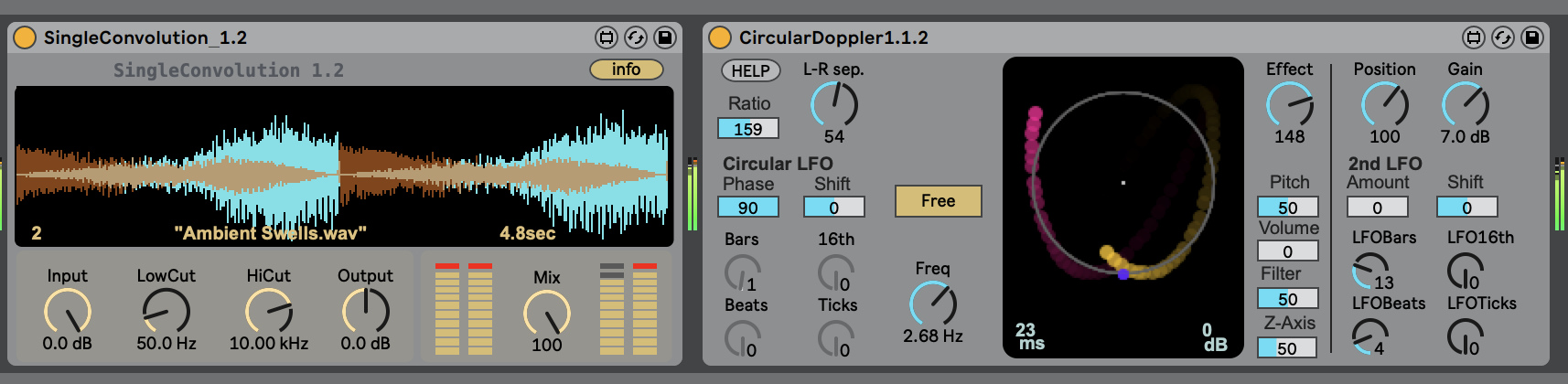
This page hosts a constantly growing selection of MaxForLive devices. MaxForLive is a flavor of the Max programing language that only works in conjunction with Ableton Live and allows users to create their own devices and to share those. In order to use these effects, one needs to own Ableton Live Version 8.1 or higher and the MaxForLive extension. More info about MaxForLive can be found on the websites of Ableton and Cycling74. All devices here are published under a Creative Commons CC BY-NC 3.0 licence.

Download the latest versions of all devices: MonolakeM4LDevices_0005_2011-07-11.zip


Distance Simulation Version 2

This audio effect device is for those who are into careful placement of sonic events in the stereo field. Its main parameter is the 'distance' control. It affects volume, filtering, pan and stereo width of the incoming audio signal. With the right choice of settings it provides a very nice simulation of a source disappearing in the distance: The further away, the less high frequencies, the more the stereo image is reduced to a mono source and the lower the signal level. New in Version 2: bipolar mode for advanced panning, adjustable lag for the distance knob, nicer GUI, transfer curves for all parameters.


The lovely Granulator 1.0 synthesizer

Granulator is a Max4Live synthesizer based on the principle of quasi-synchronous granular synthesis. It creates a constant stream of short crossfading sections of the source sample, and the pitch, position and volume of each grain can be modulated in many ways to create a great variety of interesting sounds. Granulator is the latest incarnation of a series of granular based syntheiszers I wrote for my own usage since the invention of MaxMSP in 1997. Read more...


Two parameter modulation LFOs

LFO Zero is my general purpose LFO. Features include sample and hold of waveforms, a smoothing algorithm, and - new sine may 2011 - a songtime synced reset function. LFO One is the modulation of the modulation machine: Up to three oscillators can modulate each other to create very complex waves, some kind of modular LFO synth.


A step-sequencer style parameter modulation generator

This little device allows to use a step sequencer interface to draw beat synced modulations of a paramater. Additional features include a smoothing algorithm and a nice UI.


Grain Freeze Version 2

A granular audio freezer effect. Creates lush textures out of everything! Version 2 comes with a waveform display and allows to set readout position via clicking. Try modulating that parameter with one of my LFO devices!


The legendary PX-18 step sequencer

The PX-18 is a step sequencer, originally written by me and Gerhard Behles around 1995. I developed it further till around 2001. More or less all rhythmical Monolake tracks from 1996 - 2002 have been sequenced with the PX-18 and a lot of inspiration for the way how Ableton Live deals with 'Clips' and 'Scenes' came from our experience with the PX-18. This version here offers the functionality of a single track of the original PX18.

Type: MIDI effect - File: ml.px-18 - Last update: 2010-1-11

ml.step.modulator
Step modulator

A MIDI device for transforming incoming notes via some kind of step sequencer.

Type: MIDI effect - File: ml.step.modulator - Last update: 2010-1-20

Black out screen and realtime song time

A simple device which does two things: It displays songtime in hours:minutes:seconds- at least as long as you are working with a constant song tempo. And it allows to black out the computer screen while listening to the music, which I find sometimes very important. I cannot turn off my external Apple display and this was my solution for the problem. The device also is a good example of how to work with floating windows in MaxForLive.


Circular doppler effect

Two virtual microphones rotate around a single sound source. Doppler delays, distance dependent amplitude modulation and filtering included. Movement of source and microphones synced to song position. This allows 100% reproducible effects.


Exhibition timer

Time based fade in/out and transport control. Created for an installation project. Starts the transport of Live at a given time, and fades in the audio signal of its chain / track. Fades out those channels at a specified later point in time and stops transport. There is a ml.exhibition_master device that allows to set up everything and a ml.exhibition_slave device that can be used if more than one stereo channel needs to be controlled in multichannel installations. Since May 2011 also allows to start the first scene automatically.


Modifying and Support

Feel free to open the devices and modify them in any way you want. I tried to document their code as good as possible. My idea is to not only share a finished object but also provide inspiration for own creations. This is what the Max community is all about and I very much like this spirit. If you are interested in Max, the Max forums hosted by Cycling74 are a good source of information, too. I will most likely not be able to answer questions about the devices by myself or provide help with programing issues. Comments and bug reports are welcome nevertheless. Please use max4live_at_monolake.de for this purpose. All devices here are published under a Creative Commons CC BY-NC 3.0 licence. (lern more about it)

Enjoy! Robert Henke